






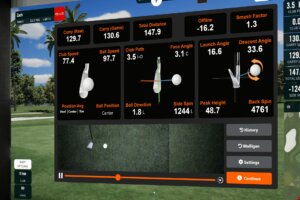
Golf simulator data can tell you far more than whether you hit a good or bad shot. Used properly, it can show why the ball flew the way it did, which patterns keep repeating, and what you should actually work on next.
The problem is that many golfers see too many numbers at once. Ball speed, spin rate, launch angle, carry distance, club path and face angle can all be useful, but not every number matters equally for every golfer.
The best way to use simulator data is to focus on the few metrics that translate clearly to the course. Whether you practise at home, use a coaching studio, or are planning a full golf simulator setup, these are the five data points that usually give golfers the most practical value.
Quick Summary: The Five Most Useful Golf Simulator Data Points
The five most useful golf simulator data points are:
1. Carry distance
2. Ball speed
3. Launch angle
4. Club path and face angle
5. Spin rate (bonus)
Together, these numbers help you understand distance control, strike quality, shot shape, trajectory and consistency.
The key is not to chase perfect numbers. The key is to learn your own patterns, then use that information to make better decisions on the golf course.
1. Carry Distance: The Number That Helps Most on the Course
Carry distance is one of the most useful simulator numbers because it tells you how far the ball travels through the air before it lands.
This is often more useful than total distance because total distance depends heavily on ground conditions. A 7 iron may release more on a dry summer fairway than it does on a soft winter green, but its carry distance gives you a more reliable baseline.
How to use carry distance in practice
Start by building a realistic carry distance map for your clubs. Do not base this on your best shots. Base it on your normal, repeatable strike.
For each club, note:
- Average carry distance
- Shortest common carry
- Longest common carry
- How often you hit the number you expect
This gives you a much clearer picture than simply saying “I hit my 7 iron 160 yards”. If your simulator data shows your 7 iron usually carries between 148 and 156 yards, that is the number range you should take to the course.
How to convert it to the golf course
On the course, use carry distance for decisions such as:
- Clearing bunkers, water or rough
- Choosing the right club into raised greens
- Playing safe away from front hazards
- Managing approach shots in colder or wetter weather
A golfer who knows their true carry numbers will usually make better club choices than a golfer who only remembers their longest ever shot.
For home practice setups, a quality launch monitor is the foundation of reliable carry data. Golf Swing Systems offers a wide range of golf launch monitors designed to help golfers track accurate performance data indoors and outdoors.
2. Ball Speed: The Simple Measure of Strike Quality
Ball speed measures how fast the ball leaves the clubface after impact. It is one of the clearest indicators of strike quality and energy transfer.
Two swings can have similar club speed, but very different ball speed. That usually means one strike was more efficient than the other.
What ball speed tells you
Ball speed can help you understand:
- Whether you are finding the centre of the face
- Whether distance loss is caused by poor strike
- Whether a swing change is improving efficiency
- Whether a club or shaft is helping you deliver more speed
For many golfers, ball speed is more useful than club speed because it shows what actually happened to the ball. Swinging faster is only valuable if the strike remains efficient.
How to convert it to the golf course
On the course, ball speed helps you understand why certain shots come up short. If you often miss greens short despite choosing the right club, the issue may not be club selection. It may be inconsistent strike.
A practical simulator drill is to hit ten shots with the same club and watch the ball speed spread. If your best 7 iron produces much higher ball speed than your average 7 iron, you are not yet repeating strike well enough.
The aim is not just more speed. The aim is a tighter range of ball speeds, because that usually means more predictable distance control.
For golfers comparing different technology options, Golf Swing Systems’ guide on how golf simulator technology works gives a useful overview of how modern systems capture ball and club data.
3. Launch Angle: How to Control Height, Landing and Shot Type
Launch angle measures the initial vertical angle of the ball as it leaves the clubface. In simple terms, it tells you how high or low the ball starts.
This is useful because golf is not played with one stock trajectory. On the course, you often need to hit shots higher, lower, softer or more controlled depending on the lie, the pin position, the wind and the ground in front of you.
A simulator gives you a safe, repeatable environment to practise those different launch windows and see how each shot behaves.
What launch angle can help you practise
Launch angle is especially useful for learning how to control trajectory.
It can help you practise:
- Higher wedge shots that land softly near the hole
- Flop shots that need to clear a bunker or short-sided hazard
- Lower pitch shots that release after landing
- Bump and run shots that use the ground rather than flying all the way to the pin
- Controlled iron shots into wind
- Higher approach shots into firm greens
This makes launch angle one of the most practical simulator metrics for short game and scoring shots. It is not just a diagnostic number. It is a way to learn how to create different flights on demand.
How to convert it to the golf course
On the course, launch angle helps you choose the right shot for the situation.
For example, if the pin is tucked behind a bunker, you may need a higher-launching wedge or flop shot that lands softly and stops quickly. If there is open green between you and the hole, an old-fashioned bump and run may be the better choice, using a lower launch and the natural contours of the ground.
Simulator practice helps you see the difference clearly. You can hit the same wedge three ways:
- A lower running chip
- A standard pitch
- A higher soft-landing shot
By comparing the launch angle, carry distance and roll-out, you start to understand which shot suits each situation.
That is where simulator data becomes genuinely useful. It helps you connect a number on the screen with a real playing decision on the course.
4. Club Path and Face Angle: The Data Behind Direction
Club path and face angle are best understood together. Club path shows the direction the club is travelling through impact. Face angle shows where the clubface is pointing at impact.
Together, they explain why the ball starts where it starts and curves the way it curves.
What they tell you
Club path and face angle help explain common shot patterns such as:
- Slices
- Hooks
- Pulls
- Pushes
- Blocks
- Overdraws
- Weak fades
For many golfers, this is the biggest lightbulb moment in simulator data. The ball flight is not random. It is usually the result of a repeating relationship between path and face.
How to convert it to the golf course
On the course, this data helps you stop guessing.
If your simulator sessions show that your club path is often left with the face open, you can understand why a slice keeps appearing. If your path is too far right with a closed face, you can understand why the ball starts right and hooks back too much.
The practical benefit is confidence. Instead of trying five different fixes during a round, you can work from a clearer understanding of your normal pattern.
When practising indoors, choose one pattern to improve at a time. For example:
- Reduce an out-to-in path by a few degrees
- Improve face control at impact
- Match path and face more consistently
- Track whether the same miss keeps appearing under pressure
Golfers who want a more advanced data-led setup can explore options such as Foresight GCQuad, which provides detailed ball and club data for both indoor simulator use and outdoor practice.
5. Spin Rate: The Number Behind Control (Bonus)
Spin rate measures how much the ball rotates after impact. It has a major influence on height, carry, curve and stopping power.
Too little spin can make the ball fall out of the air or run too far. Too much spin can make shots climb, lose distance or become harder to control in the wind.
Why spin rate matters
Spin rate affects different parts of the bag in different ways:
- Driver spin affects carry, roll and overall distance
- Iron spin affects stopping power and consistency
- Wedge spin affects control around the green
- Excessive side spin can increase curve and offline misses
Spin is especially useful when comparing clubs, balls or setup changes. If two drivers produce similar ball speed but one spins much more, the lower-spinning option may create better distance for that player.
How to convert it to the golf course
On the course, spin rate helps you understand how the ball will behave after it lands.
For approach shots, a golfer with reliable spin can be more aggressive with landing zones. For drivers, better spin control can improve both distance and accuracy.
A good simulator practice session should not just ask, “How far did it go?” It should ask:
- Did the shot launch in the right window?
- Did it spin too much or too little?
- Would that ball stop on the green?
- Would that driver flight hold up in wind?
Premium systems such as TrackMan iO, Foresight, Uneekor and other launch monitors can give golfers much deeper insight into spin, flight and delivery conditions.
How to Turn Simulator Data Into Better Golf
Simulator data only improves your golf if you use it in the right way. The numbers should support better practice, not make the game more complicated.
A simple process works best:
1. Pick one problem
Do not try to fix distance, launch, spin and direction in the same session. Choose one focus.
2. Measure your current pattern
Hit enough shots to see what usually happens, not just what happens once.
3. Make one change
Adjust setup, swing feel, club choice or strike location.
4. Check the result
Use the data to see whether the change improved the outcome.
5. Take the lesson to the course
Turn the data into a playing decision, such as club selection, target choice or shot shape.
The best players do not use simulator data to play “perfect swing”. They use it to understand their tendencies and make better decisions.
Common Mistakes When Reading Golf Simulator Data
The most common mistake is looking at too many numbers at once. A full simulator screen can be useful, but it can also distract golfers from the data that matters most.
Avoid these common mistakes:
- Chasing your longest shot instead of your average shot
- Judging a club only by total distance
- Ignoring strike quality
- Looking at spin without considering launch
- Trying to fix swing path and face angle at the same time
- Treating one bad shot as a trend
- Forgetting that course conditions still matter
Simulator data should simplify your practice. If it makes your swing thoughts more confused, narrow the focus.
Which Golf Simulator Data Matters Most for Your Game?
Different golfers should prioritise different numbers.
For beginners, carry distance and strike consistency are usually the best place to start.
For improving club golfers, ball speed, launch angle and spin rate can help with better distance control and more consistent approach play.
For stronger players, club path, face angle, spin axis and dispersion patterns become more important because smaller changes can have a big effect on scoring.
For coaches, fitters and commercial facilities, deeper data can support lessons, club fitting, gapping sessions and player development. This is one reason many serious setups use advanced systems from brands such as TrackMan, Foresight and Uneekor launch monitors.
Final Takeaway: Good Data Should Lead to Better Decisions
The most useful golf simulator data is not the biggest number on the screen. It is the number that helps you make a better decision.
Carry distance helps you choose the right club.
Ball speed helps you understand strike.
Launch angle helps you control flight.
Spin rate helps you predict control and stopping power.
Club path and face angle help you understand direction.
When these numbers are used together, they turn indoor practice into something that genuinely carries over to the golf course.
Golf Swing Systems designs and supplies simulator setups for golfers who want accurate data, realistic practice and a better way to improve year-round. To compare launch monitor options or plan a simulator around your space, speak to the Golf Swing Systems team.
Showing Category: launch monitor data
Top 5 Golf Simulator Data Points Every Golfer Should Understand
Golf simulator data can tell you far more than whether you hit a good or bad shot. Used properly, it can show why the ball flew the way it did, which patterns keep repeating, and what you should actually work on next. The problem is that many golfers see too ...
Read More


